
Track 4 · Daily operations
Registering a new patient
Save a patient record without putting them on a membership yet.
Step 1 of 7
Open the form
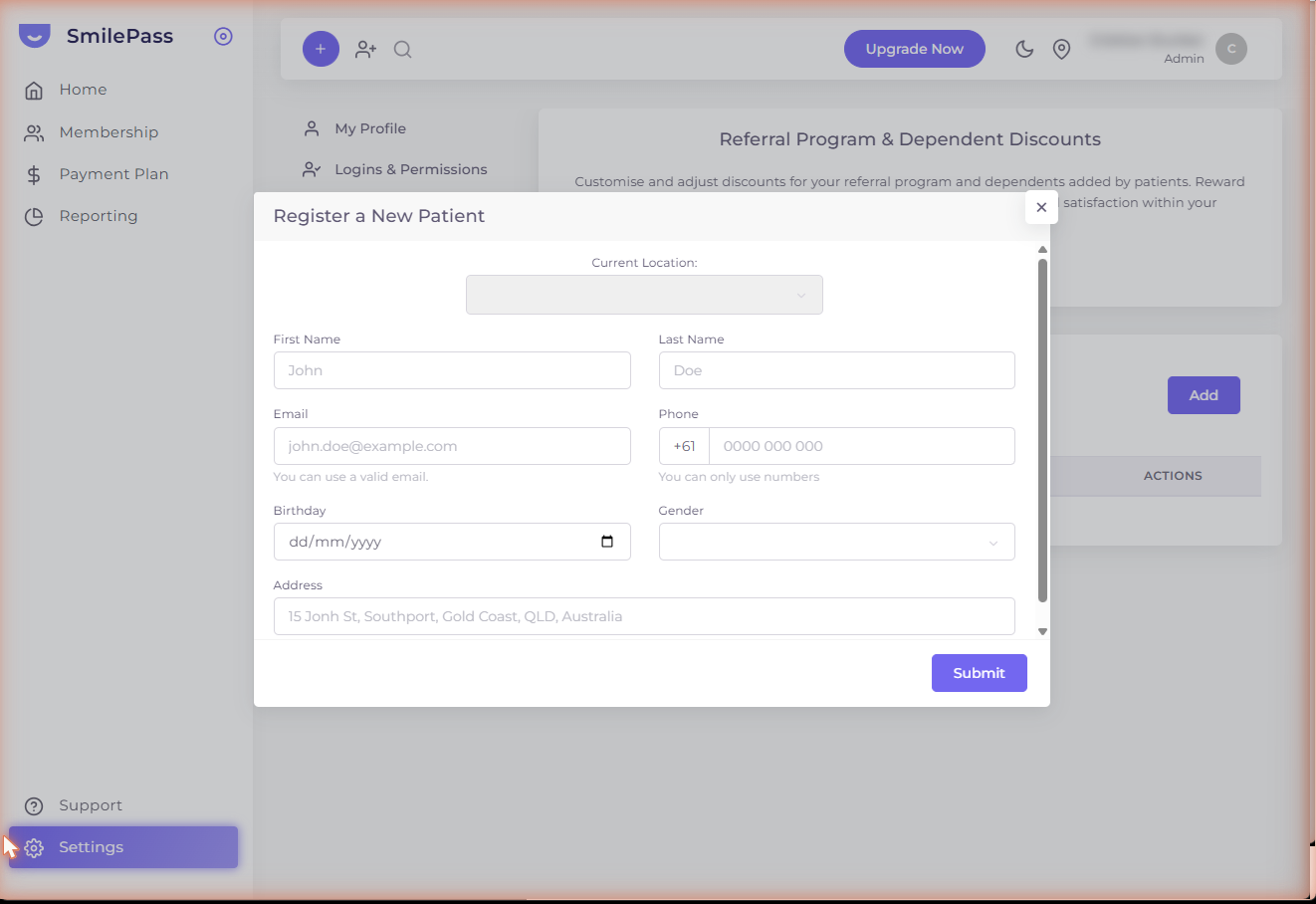
In the top bar, click the person+ icon (just right of the purple +). The Register a New Patient modal opens. Use this when a patient isn't signing up for a plan yet — a walk-in, or someone you just need on file.
Click the highlighted area or Next to continue · use ← → keys
Sometimes you want a patient in the system but they're not signing up for a plan yet — for example, a walk-in who booked a consult but hasn't decided about membership. For that, use the person+ icon in the top bar.
How to open the form
Click the person+ icon in the top bar (next to the purple +). A Register a New Patient modal opens.
If you'd rather wrap the patient in a membership in one go, use Add New Member instead.
The fields
The modal asks for:
- Current Location — which clinic this patient belongs to (defaults to the one you currently have selected via the location switcher)
- First Name · Last Name
- Email — must be a valid address; SmilePass uses it for payment links and reminders
- Phone — +61 prefix locked in; you type the rest as digits only (no spaces or hyphens)
- Birthday — date picker
- Gender — dropdown
- Address — full street address
Submit
Press Submit. The patient is saved as a bare record. You can later:
- Send them an Instant Payment link
- Convert them into a member by running the Add New Member wizard against their existing record
- See them in any patient search
When to use this vs Add New Member
| Use person+ when… | Use Add New Member when… |
|---|---|
| The patient hasn't committed to a plan | The patient is ready to sign up for a membership |
| You need a record fast (e.g. mid-appointment) | You have time to walk through the wizard |
| You want to send a single Instant Payment but they're not in the system yet | You want to bill them recurring fees |
The person+ flow takes ~30 seconds. Use it liberally — having every patient in the system makes everything else easier.
Next step
The patient signup flow →
How a patient joins a plan, end to end — they never log in.